- In Forms go to Form Bank
2. On the top right corner of the page click on Add Form

3. Click on the title to enable the edit mode, and add a title to your form (as it is required, in order to save the form)


4. Then click outside the edition box to see your changes


4. After that, you can edit the section details box


5. Then proceed to add questions to your section by pressing the button Add question

6. You can choose a variety of questions types, such as:
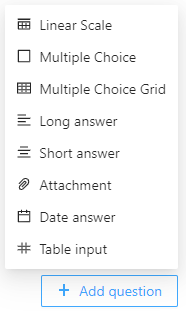
7. Then you can add more questions, by clicking on Add question in the bottom right corner of the form

8. If you wish to have more than on section of questions, you can add a new one by clicking on Add Section

9. After adding the desired questions, proceed to the options, by clicking on Options in top left of the form

10. A new page will appear with multiple settings

11. Change the start and end date, respectively, to suit your needs

12. Toggle the Only one answer per user if you wish that your users can only answer one time. If not, they will be able to change their answers until the form date reaches its end


13. If you wish that the answers of your users remain anonymous, toggle the option Anonymous. Note that you will still be able to check who answered the form


14. Finally the last setting is referent to determine whether or not the form is inquiring about someone. In this case, as the option is toggled of, the form has inquireds. The students will be the subject of the inquire (form) and each one will be assigned a form to be answered by a third party (a tutor/ teacher). The supervisors can supervise the answers given by this third party and change them.


15. If this option is toggled on, then the form is assigned to every inquirer added, for them to answer.