- Inside Quiz go to the Question Bank
2. Notice that, in this example, the question is in Draft state, as shown in the following figure

3. Click to View question

4. Then click Edit

5. In order to move Forward, you must make sure that you have correctly assigned a curricular unit, then the “Forward” option should appear on the “…” button
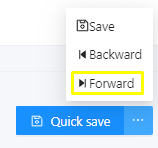
6. By selecting this option you will redirected back to the Question Bank page, you will notice that now this item will be in Edition state

7. At this point, if you edit the item you can move the question state forward again or backward, if you decide to go backward, the question will be on a Draft state again. If you decide to move forward, it will be Under review

8. By repeating the process again, you can assert a state of Finished to the question, which means that it will be ready to be used in an examination
