- Inside Quiz go to the Exam Schedule
2. On the top right click Create exam

3. Fill the Title you want to assign to the new exam

4. Add a Curricular unit to assign to the exam
5. Timed section option enables the time limit an examinee has for each section

6. Timed Questions option enables the time limit an examinee has to answer each question

7. Shuffle sections option allows sections to be displayed randomly for each examinee

8. Define the name assigned to each Section

9. Click Add question to add new questions to a section

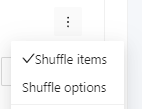
10. Shuffles the order of questions displayed in a section
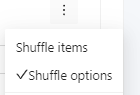
11. Shuffles the order of the options for each question
12. Time limit for a section (if Timed sections option is enabled)
13. Time limit for a question (if Timed questions option is enabled)

14. Then click Save
